Helpdesk
Helpdesk opens the Help Center where your team can manage customer requests that are handed off from the chatbot for human support.
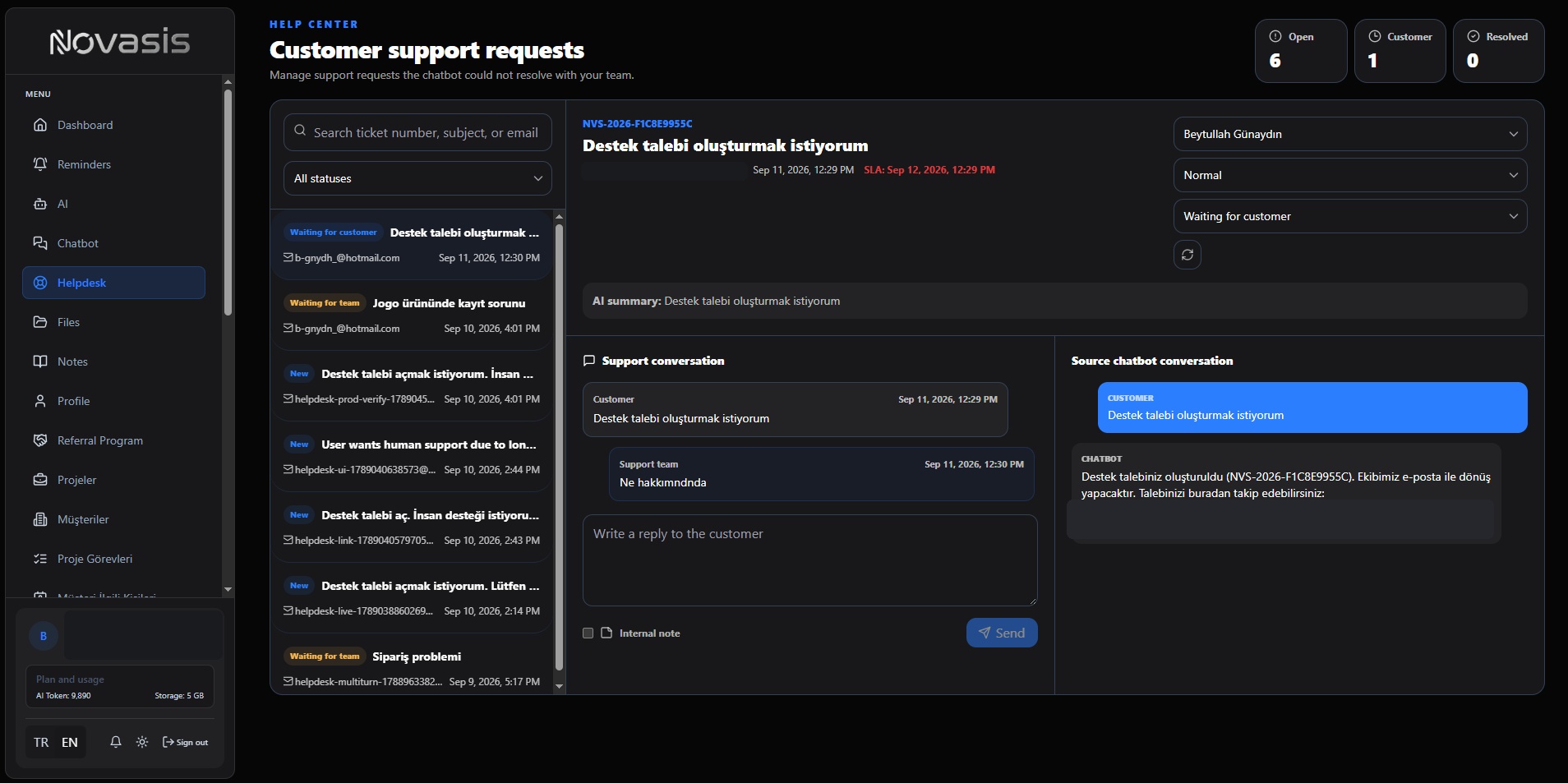
How a Request Reaches Helpdesk
When a visitor asks for support or wants to speak with a person, the chatbot conversation can be turned into a Helpdesk request.
The team can see useful context such as the request subject, customer information, creation time, and the original chatbot conversation.
Track and Manage Requests
Search requests by ticket number, subject, or email address, and filter them by status.
When you open a request, you can:
- Choose an assignee,
- Change its priority,
- Track it with statuses such as New, Waiting for team, Waiting for customer, and Resolved,
- Review the response-time information shown for the request.
Conversation and AI Summary
The request can show a short AI summary together with the chatbot conversation that happened before the handoff. This gives the support team context without asking the customer to repeat the same information.
Reply to the Customer
Reply from the request detail screen, or add an Internal note that is only for your team.
Typical Flow
- A customer talks to the chatbot and asks for human support.
- The conversation becomes a Helpdesk request.
- The team assigns the request and tracks its status.
- The source conversation and AI summary are reviewed.
- The team replies and marks the request Resolved when the work is complete.